
Guide
Print larger than A3 using the large format plotter printer
You can print items such as architecture plans on 90gsm plain paper using your My Print account
Updated on 10 September 2026
A plotter (or wide format printer) works similarly to standard printers but can print much larger.
They are often used for architecture and engineering.
Locations and prices
Plotter printers are available in:
- Main Library
- DJCAD Level 6 (for Art & Design / Architecture students)
Printing on the plotter is £4.55 per meter of paper.
You will need credit on your My Print account to print.
To print at other sizes or on different paper types, our Print Unit offers a full service to all students. Find out more on their webpage, or visit them on Level 5 of the Matthew Building
Send your document to print
You will need to have credit
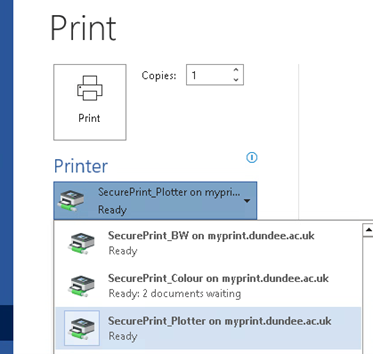
Go to the print option in the application you're using. In the list of printers you will see
- SecurePrint_Plotter on myprint.dundee.ac.uk
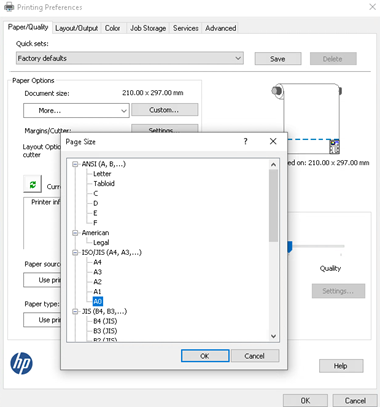
- To adjust paper size or any additional options either use your application's built-in menu or click Printer Properties/Preferences
- Click Print
Release and collect your work
When you send your work to print it will stay in the queue for 24 hours, it will only print when you go to a printer to release it.
To release the documents you have sent to print
- Hold your student card against the card reader on the stand to the right of the plotter
- You need to register your card the first time you use it, find out how below.
- The items you have sent to the plotter will appear on the screen
- Tap to select the jobs you wish to print
- The price of each job will appear on the screen
- Press the Print job(s) button at the bottom of the screen
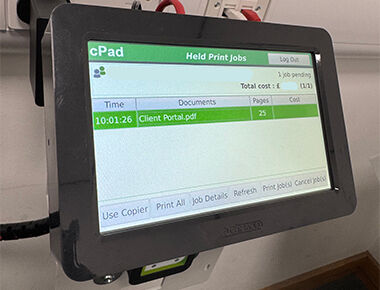
Once released the plotter will start working on the print job.
A plotter is an inkjet printer, therefore it is slower than the laser printers normally used. Jobs may take several minutes to complete depending on how long they are.
The plotter will automatically cut your paper at the end of the job, and the paper will drop into the fabric tray (similar to a hammock) when complete.